
Pitch deck analytics
Pitch deck versions: see which deck actually works
Pitch deck versions on Pitchroom keep every upload with its own slides and analytics. Compare two slide by slide to see which deck works.
Why does your deck need versions during a raise?
Pitch deck versions are the numbered copies of a deck that you keep as you revise it during a raise, each with its own file, slides and investor analytics.
Very few decks survive the first ten investor meetings unchanged. The questions you get in the first week show you what the deck failed to say: the market slide nobody believed, or the traction that sat so far back that half the readers never reached it. So you rewrite it, and you should.
The trouble is what happens to the evidence. Until now, uploading a new file to a Pitchroom deck replaced the old one. The earlier file was gone, and its views ran together with the new file's, so there was no way to tell which deck had earned which numbers. You changed the deck and lost the means to judge whether the change helped.
Deck versions keep each upload separate, with its own numbers, behind the link you already sent. You can put two versions side by side to see where investors read further, and go back to an earlier one if the new version does worse. If you are new to deck tracking, our guide to pitch deck analytics covers the signals themselves.
What does Pitchroom keep for each version?
Every new file you upload to a deck becomes a numbered version: v1, v2, v3 and so on. Each version keeps what it had while it was live:
- The original file, which you can download again.
- Its slides, which you can preview at any time.
- Its AI review and the score that came with it.
- Its analytics: the investors who opened it, how long they spent and how far they got.
The share link does not change. It always opens the live version, so an investor who already has the link sees the new deck the next time they open it, and you never have to resend anything.
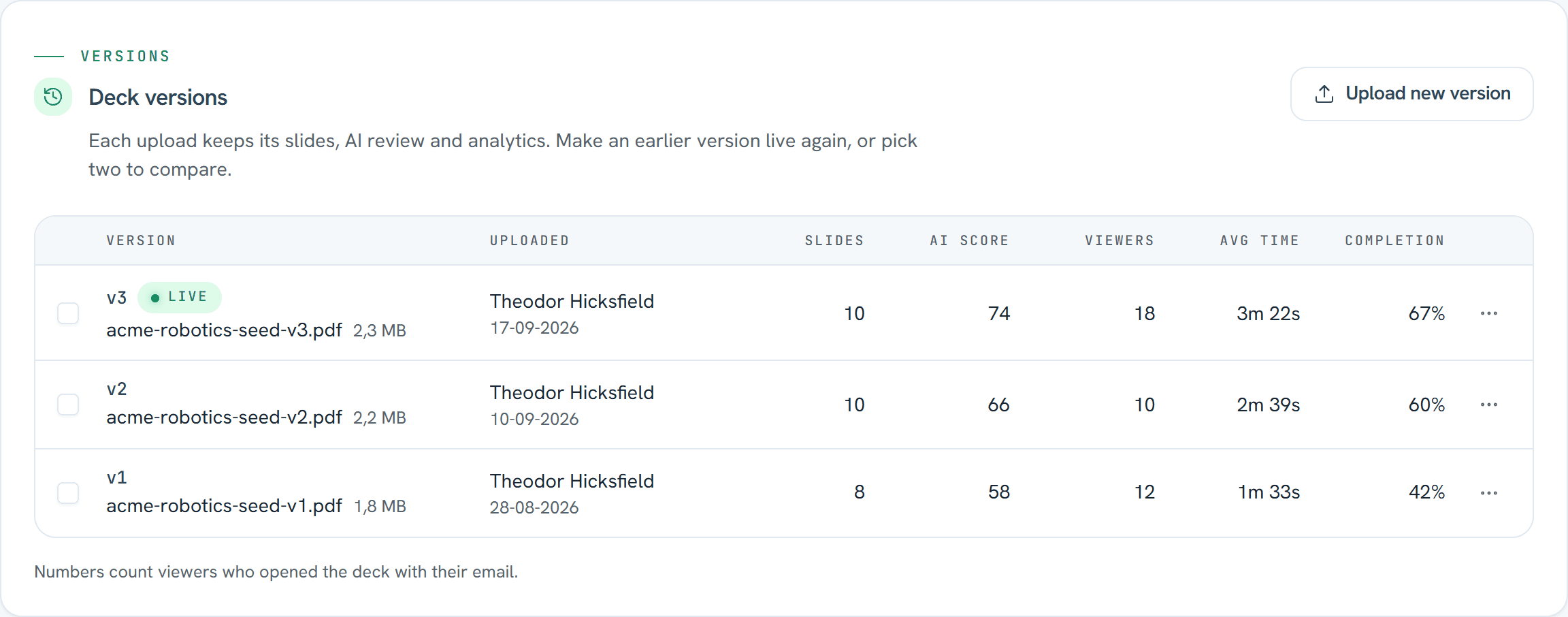
The Versions tab lists every version with who uploaded it and when, followed by Slides, AI score, Viewers, Avg time and Completion. Three of those are worth defining exactly, because they are what you will compare:
- Viewers are the investors who opened that version.
- Avg time is the total time spent on that version, divided by its viewers.
- Completionis the share of that version's viewers who reached its last slide.
Decks you already have on Pitchroom show up as v1, with all their analytics so far. The next file you upload becomes v2. Versions, Compare and Make live are on every plan, Free included, so none of this needs an upgrade. The pricing page has what each plan adds.
Uploading a new version
Press Upload new versionin the Versions tab and choose a PDF, PowerPoint or MP4 file. The new file takes a moment to convert, usually under a minute, and investors can't open the deck while it does. Anyone already reading moves to the new version at their next slide. So upload at a quiet moment, rather than in the hour after you have sent the link to a batch of investors.
Once a deck has more than one version, visitor analytics labels each page view, session and exit page with the version the investor was reading. Every page view is recorded against the version the investor loaded, so a new upload starts its numbers from zero.
How do you compare two pitch deck versions?
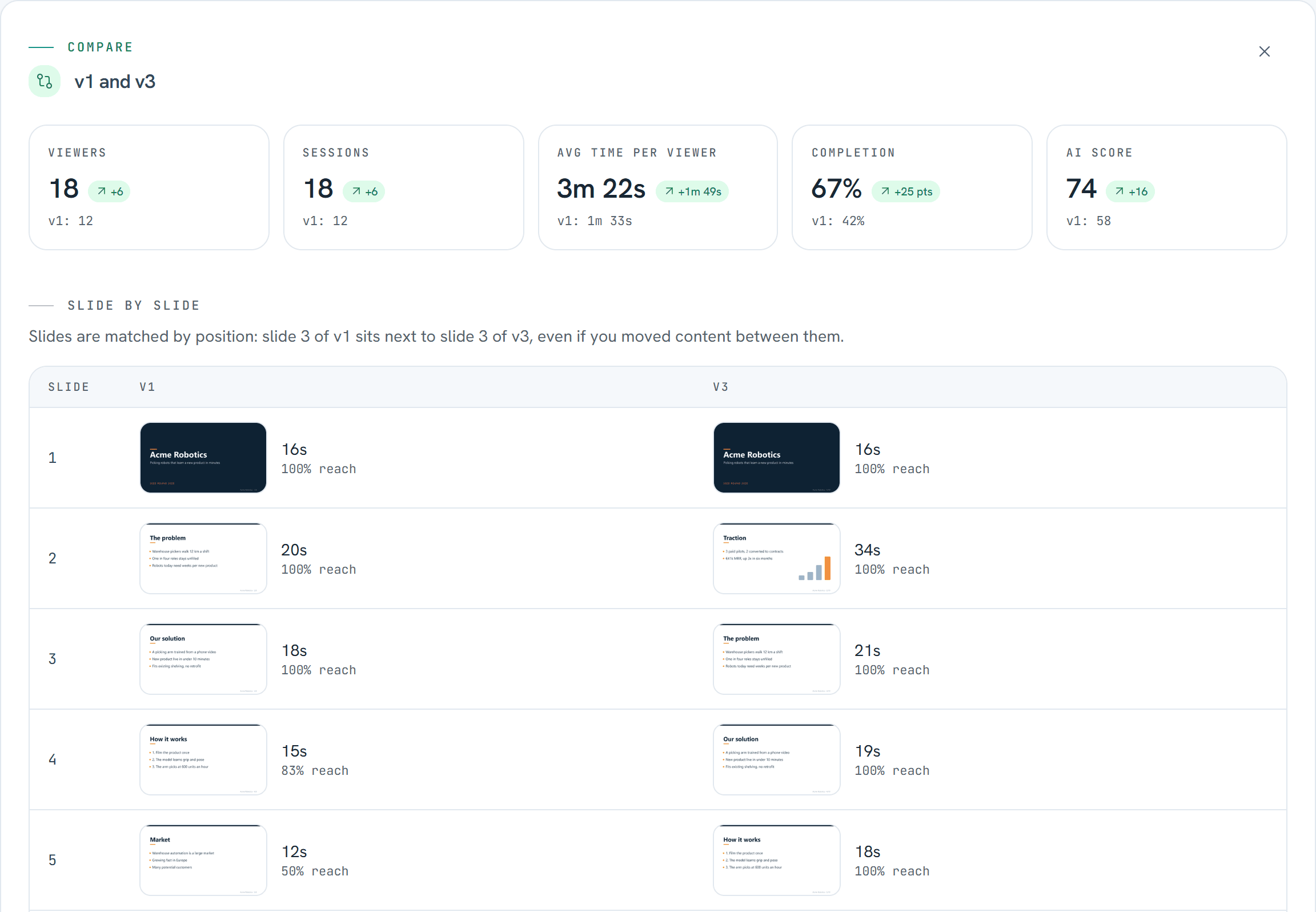
In the Versions tab, tick two versions and press the compare button, which names the pair you picked, for example Compare v1 and v3. The comparison has two parts: headline numbers for the whole deck, then the two decks slide by slide.
An example: a fictional seed deck in three versions
To make this concrete, here is Acme Robotics, a made-up company with a demo deck and made-up numbers. Its v1 had eight slides, opened with the problem and closed with the ask. Twelve investors opened it. All of them read the first three slides, but reach fell to 83% at slide 4 and to 50% at the Market slide, and only 42% reached the ask. There was no traction slide at all.
v2 grew the deck to ten slides and was read further, with 60% completion from ten viewers. v3, now live, moved proof to the front: slide 2 is a new Traction slide, and there is a Competition slide further in. Eighteen investors have opened it so far.
The headline numbers
Five tiles sit across the top: Viewers, Sessions, Avg time per viewer, Completion and AI score. Each tile shows the newer version's value, the change, and the older version's value underneath. For Acme, v3 against v1 reads: 18 viewers (+6), 18 sessions (+6), 3m 22s per viewer (+1m 49s), 67% completion (+25 pts) and an AI score of 74 (+16).
Completion changes are shown in percentage points. Going from 42% to 67% reads as +25 pts rather than +60%, which would make a change on a small base look larger than it is.
Slide by slide
Below the tiles, slide 1 of one version sits next to slide 1 of the other, slide 2 next to slide 2, and so on. Each slide carries two numbers. Time is the average per viewer who opened that slide. Reach is the share of the version's viewers who opened it. Read reach first: the slide where it drops is where investors stopped reading.
| Slide | v1 (12 viewers) | v3 (18 viewers) |
|---|---|---|
| 1 | Title · 16s · 100% reach | Title · 16s · 100% reach |
| 2 | The problem · 20s · 100% reach | Traction · 34s · 100% reach |
| 3 | Our solution · 18s · 100% reach | The problem · 21s · 100% reach |
| 4 | How it works · 15s · 83% reach | Our solution · 19s · 100% reach |
| 5 | Market · 12s · 50% reach | How it works · 18s · 100% reach |
| 6 | Business model · 13s · 42% reach | Market · 26s · 94% reach |
| 7 | Team · 13s · 42% reach | Competition · 22s · 83% reach |
| 8 | The ask · 12s · 42% reach | Business model · 21s · 78% reach |
| 9 | No slide here | Team · 19s · 72% reach |
| 10 | No slide here | The ask · 21s · 67% reach |
Slides are matched by position, not by content. Slide 2 of v1 is The problem, while slide 2 of v3 is the new Traction slide. Once you add or move slides, the rows stop lining up topic by topic, so find the same slide in each column yourself. In the Acme deck the Market slide is slide 5 in v1 and slide 6 in v3.
Read that way, the example is clear enough. In v1 half the readers had gone by the Market slide, and those who reached it gave it 12 seconds. In v3, reach holds at 100% through slide 5, the Market slide keeps 94% of readers for 26 seconds, and 67% reach the ask. Our guides to the traction slide and the market opportunity slide cover what those two slides need.
The AI review, version by version
The AI score in the comparison comes from the AI review, and a review belongs to the version it ran on. The Review tab has a Reviews by version switcher, so you can read what the review said about v1 next to what it says about v3. Any version that still has its files can be reviewed, or re-run.
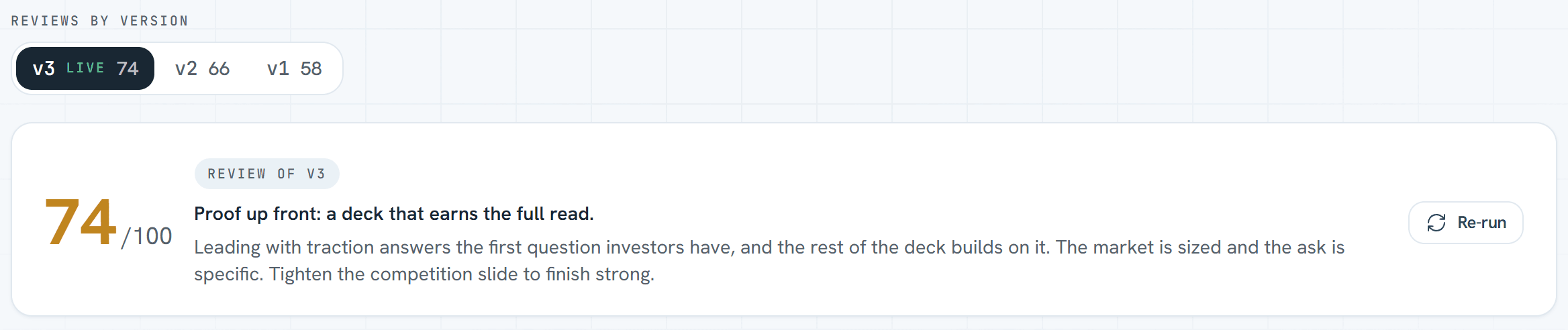
Paid plans review each new upload automatically. On the Free plan a workspace gets 2 AI reviews in total, automatic or manual, so later versions are reviewed only while reviews remain. Video pitches have no AI review. More on how the review scores a deck is on our AI fundraising page.
How do you read the numbers without fooling yourself?
A comparison between versions is a signal, not proof. Four habits keep it honest.
- Remember it is not an A/B test. Only one version is live at a time. The investors you contacted first read v1, and the ones you reached later read v3, perhaps through warmer introductions or after a good month for the company. Some of the difference is the deck, and some of it is who read it and when.
- Wait for similar numbers of viewers.With 12 viewers, each investor is worth about 8 points of completion. The Acme deck's 25-point gain is the same as three more of those twelve reaching the ask. Before you decide, let the new version collect roughly as many viewers as the old one, and treat a gap of one or two investors as noise.
- Know who is counted.The numbers include investors who opened the deck with their email, because you invited them by email or because the link has an email gate. Anonymous opens of an ungated link are not recorded, so they appear in no version's numbers. If your link travels widely, switch on the email gate before you compare.
- Look for where reach drops. An average time can rise because a few investors lingered on one slide. The slide where reach falls shows where the deck lost people, and that is the part you can fix.
Completion is left blank for video pitches and for decks with downloads switched on, because those views only record page 1. For those, compare viewers and time instead.
What if the new version does worse?
Put the earlier version back. Open the row menu on that version in the Versions tab and choose Make live. Pitchroom asks you to confirm: “Make v1 live? Investors see v1 from now on. v3 stays in Versions with its analytics. No conversion or new AI review needed.”
Once you confirm, the earlier version goes live straight away from its saved slides. There is no conversion to wait for and no new AI review. Its saved review comes back, and on the Free plan that does not use one of your reviews. The version it replaces stays in the list with all its analytics, and the share link stays the same. New views then count toward the version that is live again, on top of the ones it collected the first time.
Make live is not available while a new file is converting, or for a version whose files you have deleted.
Tidying up old versions
Each version's row menu has Preview slides, Open review, Make live, Download original and Delete files. Delete files removes the original file and the slide images from storage. The version's analytics and AI score stay, so you can still compare it, but it can't be made live or downloaded again. The live version's files can't be deleted.
Key facts
- Every file uploaded to a Pitchroom deck becomes a numbered version, v1, v2, v3 and so on, that keeps its original file, slides, AI review and analytics.
- The share link never changes and always opens the live version.
- Compare shows viewers, sessions, average time per viewer, completion and AI score for two versions, then time and reach for each slide.
- Slides are compared by position, not by content: slide 3 sits next to slide 3.
- Make live puts an earlier version back from its saved slides, with no conversion and no new AI review.
- The numbers count investors who opened the deck with their email. Anonymous opens of an ungated link are not recorded.
- Versions, Compare and Make live are on every plan, including Free at €0.
How should you iterate on your deck during a raise?
Versions pay off when you use them as a loop you repeat through the raise. Here is the loop, from the first link you send to the decision on each new version.
Step 1: Share one tracked link
Send every investor the same deck link, invited by email or behind the email gate so each open counts. The link stays the same whatever you upload later. The pitch deck sharing page covers the sharing controls.
Step 2: Let the first investors read v1
Change nothing until a first batch of investors has read it, enough that one reader does not swing the numbers. Take notes on the questions you get in meetings; they tell you why reach drops where it does.
Step 3: Check where reach drops and what the AI review says
Find the slide where reach falls, and read the review's view of the same part of the deck. When both point at the same slide, that is the one to rework first.
Step 4: Upload the new version to the same deck
Use Upload new version in the Versions tab rather than creating a new deck, so the link and the history stay together. Pick a quiet moment, because investors can't open the deck while the new file converts.
Step 5: Compare once the new version has a similar number of viewers
Tick both versions and compare. Read the headline tiles, then go slide by slide, remembering that slides are matched by position.
Step 6: Keep it, or make the earlier version live
If the new version holds readers further into the deck, keep it and start the next loop. If it does worse, choose Make live on the earlier version and try a different change.
Frequently asked questions
Does my share link change when I upload a new version?
No. The link stays the same and always opens the live version. Investors can’t open the deck while the new file converts, which usually takes under a minute, and anyone already reading moves to the new version at their next slide.
Do I lose the old deck’s analytics?
No. Each version keeps its own viewers, time, completion and AI score. Page views are recorded against the version the investor loaded, so a new upload starts its own numbers and the earlier version keeps what it collected.
Is comparing versions an A/B test?
No. Only one version is live at a time, so different investors saw each version at different points in your raise. Treat the comparison as a signal, and wait until the new version has a similar number of viewers before you decide.
Can I go back to an earlier version?
Yes. Choose Make live in the earlier version’s row menu and confirm. It goes live straight away from its saved slides, with no new conversion or AI review, and the version it replaces stays in the list with its numbers.
Which plans include deck versions?
All of them, Free included. Versions, Compare and Make live have no plan gate. AI reviews follow your plan: a Free workspace gets 2 in total, automatic or manual, and paid plans are unlimited, with each new upload reviewed automatically.
Can I delete an old version?
You can delete its files. The original and its slide images leave storage, while its analytics and AI score stay so you can still compare it. A version without files can’t be made live or downloaded again, and the live version’s files can’t be deleted.
Which views count?
Investors who opened the deck with their email, whether you invited them by email or they came through the email gate. Anonymous opens of an ungated link are not recorded. Completion is the share of a version’s viewers who reached its last slide, and it is left blank for video pitches and for decks with downloads switched on.
What happens to decks I updated before versions existed?
They show as v1, with all their analytics so far. Files replaced before deck versions launched were not kept, so views of those earlier files count toward v1 as well. Separate versions start with your next upload.
Last updated

Written by Pitchroom
Pitchroom is a fundraising platform for startup founders, built and hosted in the EU. Deck sharing with page-by-page analytics, data rooms, an investor database and a fundraising pipeline in one workspace.